Adjustable target
Choose the LUFS level that fits your destination.
Download and use LUFScale at no cost. It is distributed under the GNU GPL‑3.0-or-later license.
View source code on GitHub ↗Supported audio formatsMP3 · FLAC · WAV · AIFF · M4A · OGG · Opus
Measured and verified audio normalization
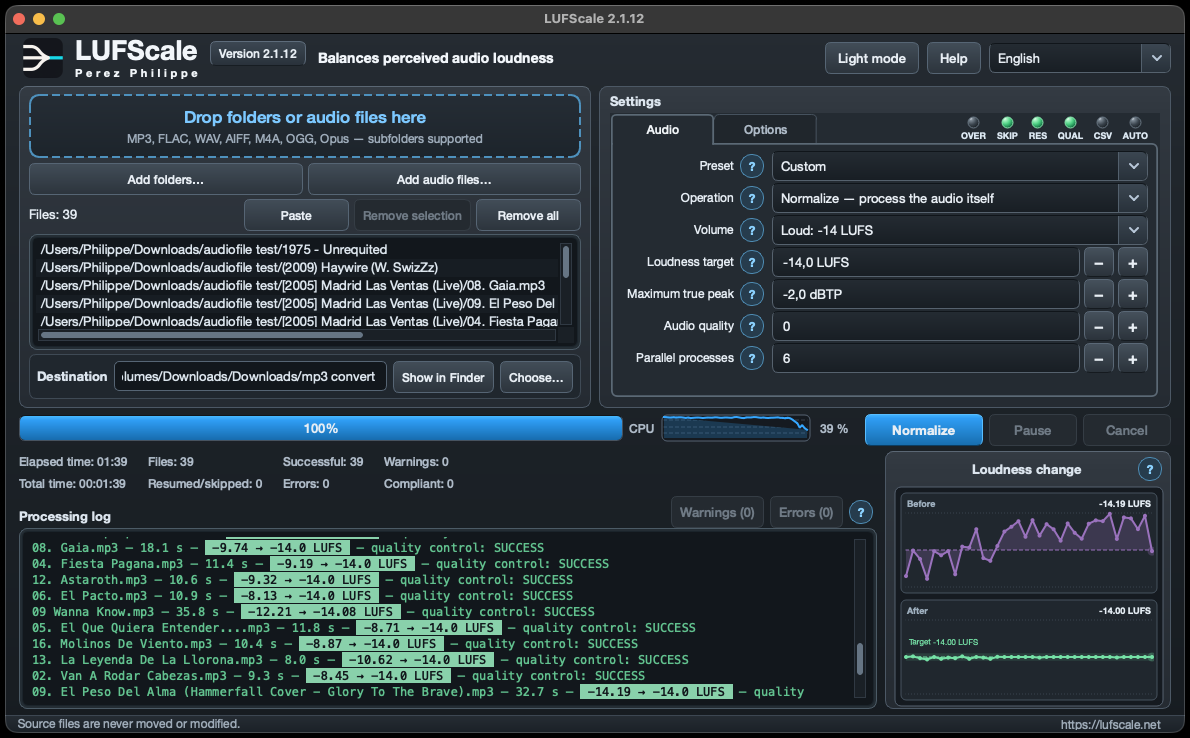
LUFScale measures the loudness of your files and, with Normalize, physically adjusts their perceived volume toward a LUFS target while controlling True Peak. Each source is analysed over its full duration, then the output is measured again and verified. The result does not depend on tags or a compatible player: levels become more consistent from file to file, deviations are flagged, and originals remain untouched.
LUFS + True Peak
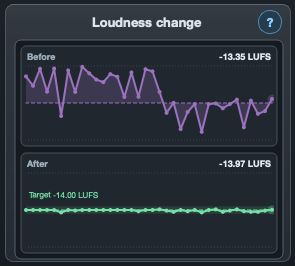
A useful difference must do more than change a graph: it must reduce audible level jumps and remain demonstrable with repeatable measurements. Integrated LUFS describes perceived loudness over time, while True Peak monitors peaks that may overload playback or encoding. LUFScale combines both, then remeasures the output to confirm the target and the chosen ceiling.
Choose the LUFS level that fits your destination.
Set a peak limit and verify the output.
Measure each output again automatically.
The audio engine runs on your computer.
Keep measurements, durations, statuses, errors and warnings with the processed files.
Choose with confidence
Choose exactly what should happen to each file.
Re-encodes the audio stream, brings each file toward the LUFS target, and applies the True Peak limit.
Preserves audio samples and writes suggested gain metadata for compatible players.
Measures loudness and peak without creating an audio output.
Demo video
Watch the LUFScale demonstration in English.
macOS + Windows
Download the ready-to-use edition or the reproducible source build kit. On Windows, choose the recommended Setup or the no-install Portable edition.
macOS 12 or later · Apple Silicon / Intel
Self-contained app: unzip it, move it to Applications, and open it. No Python, Qt or FFmpeg installation is required.
—Self-contained app: unzip it, move it to Applications, and open it. No Python, Qt or FFmpeg installation is required.
—Single archive for publishers containing the LUFScale source and build tools, exact FFmpeg and codec sources, licences, notices, and Apple Silicon and Intel release manifests. It is not required to install or run LUFScale.
—Windows 10 or 11
Installs LUFScale normally for regular use.
—Runs directly and can be copied to another computer.
—For publishers: fetches verified build prerequisites, packages the app, then compiles the offline installer.
—Download the illustrated PDF for your language and platform. (These guides are already included in the application itself.)
Project history
A concise, verified history. Open it only when you want the details.
FAQ
No. It writes gain and peak tags without changing the audio samples. A compatible player applies the gain during playback.
No. It measures source files and can create a report, but it produces no audio output.
No. It is a common setting, not a universal rule. LUFScale lets you choose the target and True Peak limit for your destination.
LUFScale supports MP3, FLAC, WAV, AIFF, M4A, OGG, and Opus, including files found in subfolders.
No. Sources remain untouched. LUFScale writes results to the destination and preserves the folder tree.
Track processes each file separately. Album first measures the folder, then applies one shared gain so the intended differences between tracks are preserved.
When it is already within ±0.5 LU of the target and remains below the selected True Peak ceiling, it can be copied byte for byte without new quality loss.
Each normalized output is measured again. LUFScale checks the achieved loudness and True Peak, then clearly flags any result outside the accepted tolerance.
Cache and resume data identify unchanged sources, settings, and outputs. Work already completed can therefore be skipped safely when the run resumes.
Automatic parallelism adapts the number of simultaneous jobs to CPU load. Cumulative work time across jobs is therefore different from the actual elapsed time.